Additional: You can also use this free XML Sitemap Generator for sitemap generation.
Featured 1
Lorem ipsum dolor sit amet, consectetuer adipiscing elit, sed diam nonummy nibh euismod tincidunt ut laoreet dolore magna aliquam erat volutpat. Ut wisi enim ad minim veniam, quis nostrud exerci tation ullamcorper suscipit lobortis nisl ut aliquip ex ea commodo consequat Readmore...
Featured 2
Lorem ipsum dolor sit amet, consectetuer adipiscing elit, sed diam nonummy nibh euismod tincidunt ut laoreet dolore magna aliquam erat volutpat. Ut wisi enim ad minim veniam, quis nostrud exerci tation ullamcorper suscipit lobortis nisl ut aliquip ex ea commodo consequat Readmore..
Featured 4
Lorem ipsum dolor sit amet, consectetuer adipiscing elit, sed diam nonummy nibh euismod tincidunt ut laoreet dolore magna aliquam erat volutpat. Ut wisi enim ad minim veniam, quis nostrud exerci tation ullamcorper suscipit lobortis nisl ut aliquip ex ea commodo consequat Readmore...
Featured 4
Lorem ipsum dolor sit amet, consectetuer adipiscing elit, sed diam nonummy nibh euismod tincidunt ut laoreet dolore magna aliquam erat volutpat. Ut wisi enim ad minim veniam, quis nostrud exerci tation ullamcorper suscipit lobortis nisl ut aliquip ex ea commodo consequat Readmore...
Featured 5
Lorem ipsum dolor sit amet, consectetuer adipiscing elit, sed diam nonummy nibh euismod tincidunt ut laoreet dolore magna aliquam erat volutpat. Ut wisi enim ad minim veniam, quis nostrud exerci tation ullamcorper suscipit lobortis nisl ut aliquip ex ea commodo consequat Readmore...
How to Generate and Add XML Sitemap?
Additional: You can also use this free XML Sitemap Generator for sitemap generation.
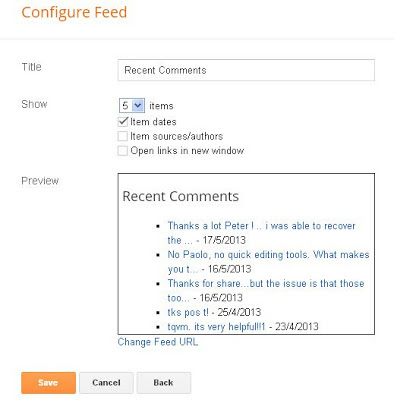
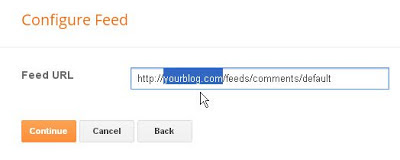
RECENT COMMENTS USING BLOG FEED

Then click CONTINUE and you will be presented with a CONFIGURE FEED popup. Then type in the title "Recent Comments" or any other title as you wish and tick the options you want as shown in the screenshot below:

Click SAVE and you are done.
If you have a custom domain for your blog, you may also use the alternative feed URL such as http://www.YOURBLOG.com replacing YOURBLOG with the actual URL of your custom domain blog.
RECENT COMMENTS BY EDITING TEMPLATE
If you are comfortable with editing your blog template, you may also add this code to your template:
<h2 class="sidebar-title">Recent Comments</h2>
<ul>
<Blogger>
<BlogItemCommentsEnabled>
<BlogItemComments>
<li><$BlogCommentAuthor$> //
<a href="<$BlogCommentPermalinkURL$>">
<$BlogCommentDateTime$></a></li>
</BlogItemComments>
</BlogItemCommentsEnabled>
</Blogger>
</ul>
</MainPage>
New Blogger contact form gadget

There are only 3 fields (boxes) - Name, Email and Message.
To add a contact form, sign into Blogger (Dashboard), click the down arrow of the drop down menu on the extreme right side, select LAYOUT as shown in the screenshot below:
At the popup, click MORE GADGETS on the left side, then select CONTACT FORM.
Now whenever anyone submits the contact form, you will receive a message in your email INBOX (the email which you used as a username for your Blogger account).
clear cache, cookies, browsing history
This is how you can clear your cache memory for the following browsers:
Internet Explorer 7
Click "Tools" tab at the menu bar
Select "Internet Options"
Click on the "General" tab
Under "Browsing history", click on the "Delete" button
Click on "Delete files"
Click on "Delete cookies"
Click "Close" and "OK" to exit
Internet Explorer 8
Click "Tools" tab at the menu bar
Select "Internet Options"
Click on the "General" tab
Under "Browsing history", click on the "Delete" button
Uncheck "Preserve Favorites website data"
Ensure that both "Temporary Internet Files" and "Cookies" are checked
Click on the "Delete" button
Click "OK" to exit
Google Chrome 18+
Click on the tool icon on the top right hand corner
Select "History"
Click "Clear all browsing data"
Ensure that both "Empty the cache" and "Delete cookies and other site and plug-in data" are checked
Click on the "Clear browsing data" button
Mozilla Firefox 11+
Click "Tools" tab at the menu bar
Select "Options"
Click on the "Privacy" tab
Under "History", click on the "clear your recent history" hyperlink
Ensure that both "Cookies" and "Cache" are checked
Click on the "Clear Now" button
Safari 5+
Click on "Safari"
Select "Empty Cache"
Click "Empty"
Click on "Safari"
Select "Preferences"
Select "Privacy" tab
Click "Remove All Website Data"
Click "Remove Now"
HTML Code For Simple Links
CODE:
<a href="choose your url">choose your link name</a>
EXAMPLE:
<a href="http://khazana-soft.blogspot.com/">ultimate blogging tips and tricks</a>
- See more at: http://ultimate-blogging-tips-and-tricks.blogspot.com/#sthash.webNrLlZ.dpuf


